Pause or cancel a subscription?
Most people asking this question are not trying to leave. They have too much product stacked up, they are travelling, or money is tight this month. All three are pause situations being solved with the cancel button, because cancel is usually the more obvious of the two.
What is the difference between pause and cancel subscription?
Pause is temporary and reversible. Cancel is permanent. Everything else follows from that.
| Pause | Cancel | |
|---|---|---|
| Billing | Stops for the length of the pause | Stops permanently |
| Deliveries | Stop until you resume | Stop permanently |
| Your plan and price | Kept, including any subscribe-and-save discount | Closed - you re-subscribe at current prices |
| Coming back | Resume in one click | Sign up again from scratch |
| Your settings | Products, quantities and cadence stay as they were | Set up again |
| Reversible | Yes | Not usually |
The part people miss is the price. A paused subscription carries its original terms back with it. A cancelled one does not. If you signed up during a launch discount two years ago, cancelling is how you lose it.
Is it better to pause or cancel a subscription?
Pause if there is any realistic chance you will want it again. There is almost no downside - you are not billed while paused, and the option to cancel later stays open. Pause is the reversible choice, and the reversible choice is the right default when you are not sure.
Cancel when the answer is genuinely no. You have switched brands, the product did not suit you, or you have finished with the category entirely. Cancelling in that situation is cleaner than a pause you will forget about.
A simple test: if you can name roughly when you would want the next delivery, pause and set it to that date. If you cannot, cancel.
One thing to check before you pause: how the store resumes you. Some resume automatically on the date you picked, some wait for you. A well-built pause sends a reminder a few days before the first charge so nothing arrives as a surprise. If your store does neither, put a note in your calendar.
How do I pause my subscription?
- Open the account or subscription portal on the store's website - usually under Account, My subscriptions, or a link in your order confirmation email.
- Find the subscription you want to change.
- Open Manage or Edit subscription and look for Pause.
- Choose how long. One, two and three months are the usual options.
- Confirm, and check whether it resumes automatically or waits for you.
If you start the cancellation instead, many stores offer pause as an alternative before finishing the cancellation - so you can still switch. And if there is no pause option anywhere, the store has not enabled one; emailing support and asking is often faster than cancelling and re-subscribing later.
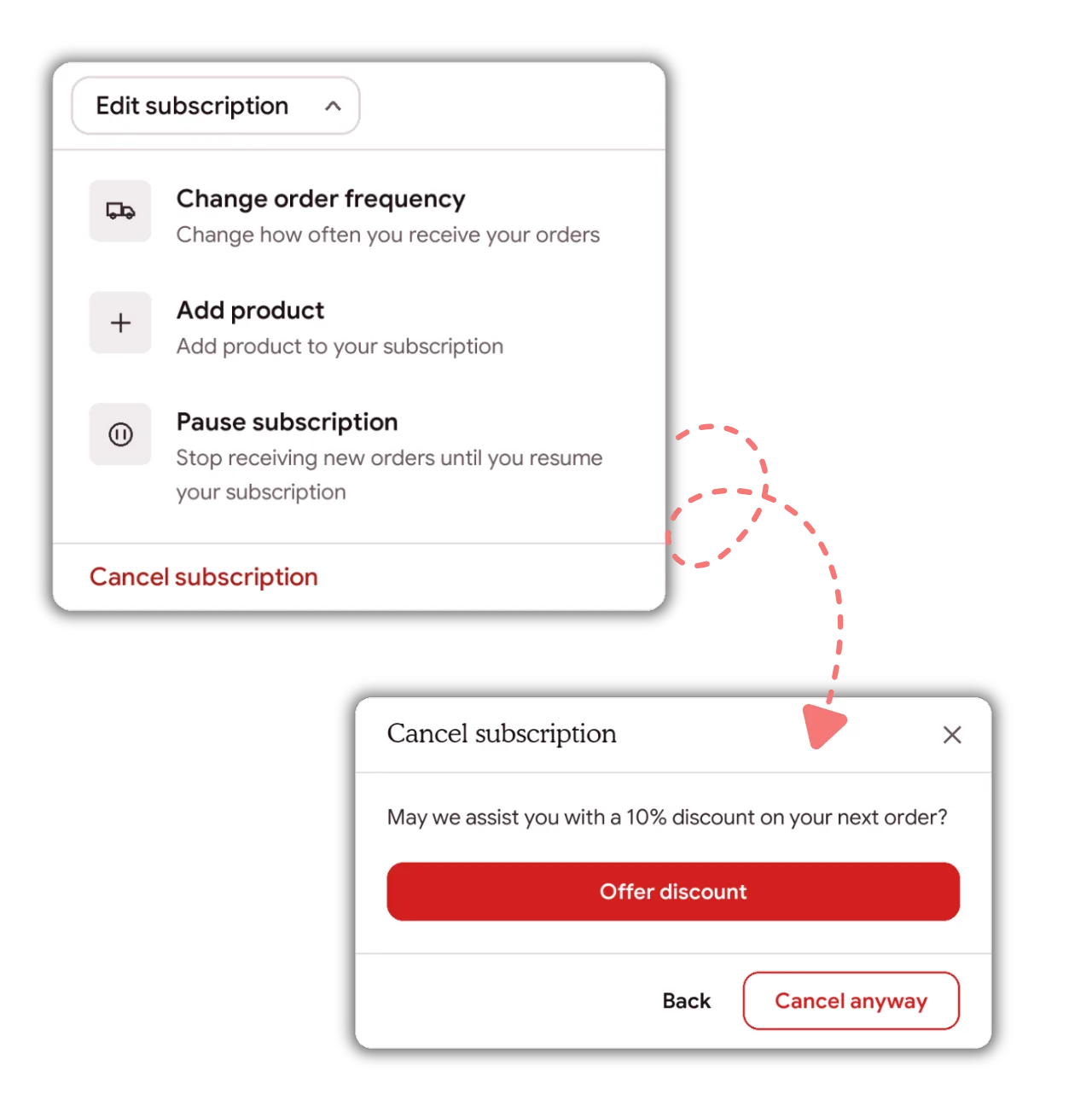
On a Shopify store running Joy Subscriptions, pause sits inside the Edit subscription menu, directly above Cancel subscription, and the cancel screen offers a save option before the cancellation completes.
For merchants: pause belongs above cancel
Everything above is the subscriber's side. The merchant's side is simpler: pause is the cheapest retention tool you have, and most stores hide it.
Across 59,964 Shopify subscription contracts running on Joy, 15.7% are paused rather than cancelled - 9,406 contracts across 690 shops. Those are subscribers who kept their plan, their price and their settings instead of disappearing. Without a pause option, most of them would be in the cancelled column.
Two more numbers, from Recurly's 2026 State of Subscriptions across 76 million subscribers and 2,200 merchants:
- Three of every four subscribers who pause eventually return. Cancellations do not come back at anything close to that rate.
- Merchants offering a pause-before-cancel option saw pause usage rise 337% year over year. The demand was already there; the button was not.
The same report finds 52% of consumers cancelled at least one subscription in the past year simply for lack of use - which is the textbook case for a pause rather than an exit - and that returning subscribers now drive nearly one in four new sign-ups.
How to make pause work rather than just exist
- Put it in the cancel flow, not just the portal. A pause option the subscriber has to go looking for saves nobody. Offer it at the moment they click cancel.
- Offer real lengths. One, two and three months covers most reasons people leave. A 30-day cap pushes anyone travelling for two months into cancelling.
- Send a reminder before the resume charge. A subscriber who is charged unexpectedly on day 61 cancels permanently, and you have converted a save into a worse outcome than the original cancellation.
- Ask why, in one question. Pause reasons tell you whether your real problem is cadence, volume or price - and cadence is usually fixable in a settings change.
- Report paused separately. Not active, not churned. Folding pause into churn hides the tool that is working. We wrote up what that does to the numbers in subscription churn benchmarks.
What this looks like in Joy
Joy Subscriptions runs pause as its own flow alongside the cancellation flow, with its own offers and its own durations. Save actions include pause, skip, swap, change frequency, change the next order date, edit quantity, a discount, a free gift, or a handoff to support - each targetable by conditions evaluated on the live contract at the moment the subscriber clicks. Pause and cancel are tracked separately in reporting, so you can see what pause is actually retaining rather than assuming.
More detail on the flow itself is on the cancellation and pause flows page, and the subscriber-side controls are on the customer portal page. For definitions, see pause subscription and cancel the subscription.